What hidden rating is
Beyond the visible rank (Herald through Immortal), Valve's matchmaking uses a hidden account strength metric. This metric determines who you are matched against and how your public MMR grows.
For example: two Ancient 5 players can have different hidden MMR. One might face a Divine 2 opponent, the other an Ancient 3. This explains "confusing" matches against clearly stronger opponents.
Valve deliberately hides this metric — players are not supposed to focus on "optimizing" their stats. MMR Tracker makes it visible (on your client side) without changing the matchmaking algorithm itself.
What MMR Tracker shows
- Account hidden MMR — a precise estimate based on match history (like OpenDota, but in real time, not delayed).
- MMR of all 10 players — the approximate hidden rating of every one of the 10 players in the match: see the strength of allies and opponents right on the loading screen.
- MMR change per match — how much was gained or lost. Visible immediately after the game; no need to wait for seasonal calibration.
- Trend over 30 / 60 / 90 games — growth/decline graphs in the overlay.
- MMR icon — a compact badge with the rating next to the nickname instead of the full panel.
- Strength matchmaking — hidden MMR estimate for both teams at the start of the match.
Custom MMR and Rank Changer
Beyond displaying real data, the module can override what you alone see in your own client:
- Custom MMR — set any arbitrary MMR value to be shown on your side. This is purely cosmetic: your real ladder rating does not change, and only you see the number.
- Rank Changer — swaps the displayed rank/medal in the client. Use the Rank Tier select to pick the tier you want, from Herald to Immortal. The change is client-side: other players and the server still see your real medal.
- Hide MMR during match — hides your own value for the duration of the game, so you are not distracted by the numbers and do not expose your rating on stream.
Custom MMR and Rank Changer are client-side cosmetics: only you see the overridden value and medal. They do not change your real rating in Valve's matchmaking.
How to enable MMR Tracker
- Launch Umbrella (download the loader).
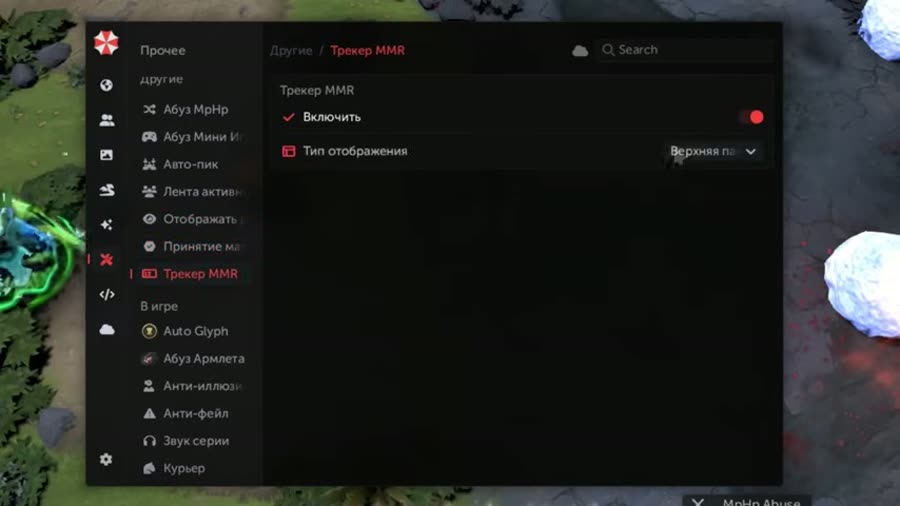
- In the cheat menu open the Miscellaneous section and activate MMR Tracker.
- Choose the display mode via Display Type:
- Separate panel — a compact widget with numbers in a screen corner.
- Under nickname — embedded in the standard loading screen next to the player's name.
- The per-game MMR change and hidden rating are displayed automatically — especially useful during calibration of a new account.
Why this matters
- Understand your opponents' strength — see who is really carrying and who is just along for the ride.
- Real progress — not "I think I went up" but exact numbers per game.
- Transparent calibration — see your hidden MMR before Valve officially "calibrates" you.
- Boosting + analysis — if you are grinding MMR for sale or analyzing your own gameplay, real-time numbers mean faster feedback.
FAQ
Is the hidden MMR accurate?
It is an estimate based on match history — like OpenDota, but updated in real time. Accuracy: ±50–100 MMR.
Will this raise my rating?
The tracker itself will not — it only shows data. But Umbrella provides tools for winning (Maphack, scripts) — those directly affect MMR.
Can other players see the overlay?
No, MMR Tracker is a client-side overlay. Only you see the data. It is safe even on streams with proper settings.
Is it safe?
MMR Tracker is a read-only module with no interference in game logic. The safest feature in Umbrella. Use it with Spoofer for complete privacy.